


2018 School Spending Survey Report

Find more great Horn Book content at these links:
Recommended books: reviews and themed booklists
App and e-book reviews
Movie reviews
Event news and recaps
Events calendar
Breathe, Think, Do with Sesame app review
Simple app Breathe, Think, Do with Sesame (Sesame Workshop, December 2013), starring a blue, horned Sesame Street monster, models the "Breathe, Think, Do" problem-solving strategy for the very youngest (ages 2-5): "First.
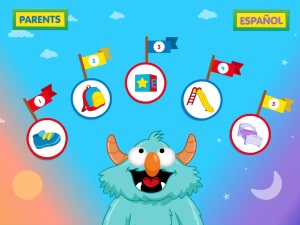 Simple app Breathe, Think, Do with Sesame (Sesame Workshop, December 2013), starring a blue, horned Sesame Street monster, models the "Breathe, Think, Do" problem-solving strategy for the very youngest (ages 2-5): "First...breathe to calm down after facing a challenge; next, think of plans to solve the problem; and then choose one of the plans." (From the "About This App" note in the "For Parents" section; useful "Tips and Strategies" are also offered).
The opening screen shows the smiley monster looking up at five easy-to-identify icons (sneaker, backpack, block, slide, bed). The eager narration — in English or Spanish — urges: "Go ahead, tap on ones of these." Each icon then takes us to a kid-centric scenario; selecting the backpack, for example, brings us to school. The narrator calls attention to visual cues about the monster's state of mind: "Oh, no. The monster is frowning and it looks like he might cry. He feels sad because he's not happy that it's time to say goodbye to his mommy." (The "sneaker" scenario models frustration at not being able to put on his own shoes; the "block" scenario models disappointment when the monster's block tower topples over.)
Step 1: Breathe
The next screen shows the still-frowning monster against a red background. "Tap on the monster's belly to help him put his hands on it. / Tap slowly on his belly." The monster breathes in and out, and the background color lightens as the monster's face relaxes ("Look! The monster is calming down. He needs to take another breath. Tap on his belly again"). After three slow breaths: "Yes! He looks much calmer."
Step 2: Think
On the next screen we "help" the monster think of a plan. Bubbles appear over his head, and kids tap to pop them (the popping sound effects, along with monster-thinking noises, make this extra-fun) while the narrator says: "Think think think...Aha!" In the "Personalize This App" section (in the parents area) you an record your or your child's voice to encourage the monster: "Think of a plan! Keep thinking! You've almost got a plan!"

The app then presents three problem-solving ideas; in the case of school: 1. find a friend to play with; 2. draw a picture of someone he loves to look at during the day; 3. ask a grownup, like his teacher, for a hug.
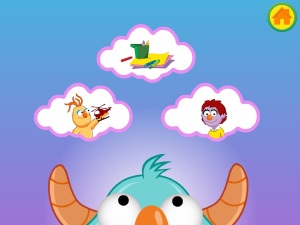
Kids pick one of the choices, which brings us to:
Step 3: Do
The monster successfully implements the chosen plan. The narrator does a quick recap ("remember: breathe, think, do; you can always ask a grownup for help"), then the monster celebrates with confetti (which kids can tap).
Learning life skills and having silly fun — this is a child-friendly, research-based app that could be very useful for a variety of settings.
Available for iPhone, iPad, and iPod touch (requires iOS 6.0 or later) and Android devices; free. Recommended for preschool and primary users.


Added To Cart
RELATED


RECOMMENDED

Please register with us to continue reading.
ALREADY A SUBSCRIBER? LOG IN
We are currently offering this content for free. Sign up now to activate your personal profile, where you can save articles for future viewing.
ALREADY A SUBSCRIBER? LOG IN
Thank you for visiting.
We’ve noticed you are using a private browser. To continue, please log in or create an account.

Add Comment :-
Be the first reader to comment.
Comment Policy:
Comment should not be empty !!!