



2018 School Spending Survey Report

Find more great Horn Book content at these links:
Recommended books: reviews and themed booklists
App and e-book reviews
Movie reviews
Event news and recaps
Events calendar
MOMA Art Lab app review
Yesterday was rainy and gray and a little grumpy around here, but my discovery of the Museum of Modern Art's free Art Lab app (2012) — based on their child-friendly interactive exhibits — brightened my afternoon.
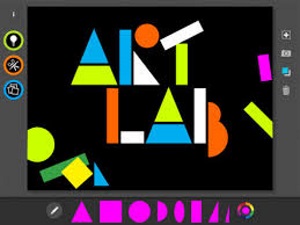 Yesterday was rainy and gray and a little grumpy around here, but my discovery of the Museum of Modern Art's free Art Lab app (2012) — based on their child-friendly interactive exhibits — brightened my afternoon.
The first element of the app is a canvas with line, shape, and color toolbars accessible at the bottom of the screen. Drag and drop, rotate, copy and paste, send forward or back, switch color, or delete your shapes and lines with the tap or swipe of a fingertip. Icons along the right side of the canvas allow you to save your work, change the canvas color, or start over. Tap on the light bulb icon on the left to get some tips and project ideas such as "Experiment with stretching, turning, shrinking, and layering shapes" or "Draw for ten seconds without lifting your finger. Color in any shapes that were created."
Just as I was thinking this is fun, but it'd be great if there were an art history component, I tapped on the "activities" icon (also on the left) and discovered nine projects based on specific artists' work. A brief overview of the featured artist's style or philosophy, accompanied by a photo (and occasional video clip, where appropriate) of one of her or his iconic works, introduces each activity. Explore visualizing sound like Elizabeth Murray, make a chance collage like Jean (Hans) Arp, virtually "draw with scissors" like Henri Matisse, or create a shape poem like Brice Marden. Some of the activities are more successful than others, but overall the experience is both educational and enjoyable.
I wish I had had this app back when I was working on the Picture This–inspired picture book project for Susan Bloom's Picture Book class. (Although that's probably cheating.) Here are four versions of the same concept — with varying levels of dynamism based on the app's prompts:
 My original composition.
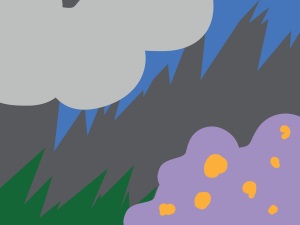 Prompt: "Experiment with stretching, turning, shrinking, and layering shapes."
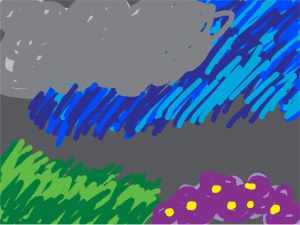 Prompt: "Paint over your artwork by layering different lines, shapes, and colors" like Arshile Gorky.
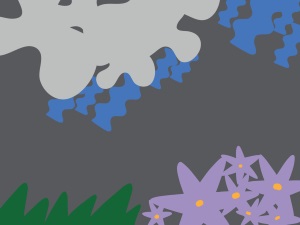 Prompt: "Draw with scissors" with more organic shapes á la Matisse.
A tutorial gives an overview of the app's straightforward navigation; an info icon tells more about the museum itself; a speaker icon allows you to hear any portion of the text read aloud; and from the gallery you can save your art to your camera roll or send it to a friend — or to MOMA! (For privacy, send features must be enabled in your devices' settings menu first.)
MOMA has several more educational apps and ebooks about the museum and its exhibits. Rock on. Stay tuned for reviews of those. Available for iPad (requires iOS 5.0 or later); free. Recommended for primary users and up.



RECOMMENDED

Please register with us to continue reading.
ALREADY A SUBSCRIBER? LOG IN
We are currently offering this content for free. Sign up now to activate your personal profile, where you can save articles for future viewing.
ALREADY A SUBSCRIBER? LOG IN
Thank you for visiting.
We’ve noticed you are using a private browser. To continue, please log in or create an account.

Add Comment :-
Be the first reader to comment.
Comment Policy:
Comment should not be empty !!!