


2018 School Spending Survey Report

Find more great Horn Book content at these links:
Recommended books: reviews and themed booklists
App and e-book reviews
Movie reviews
Event news and recaps
Events calendar
Sound Rebound app review
"Sound Rebound is an offbeat experience of color and sound that invites you to create ricochets, bounces, or bumps to investigate seeing and hearing.
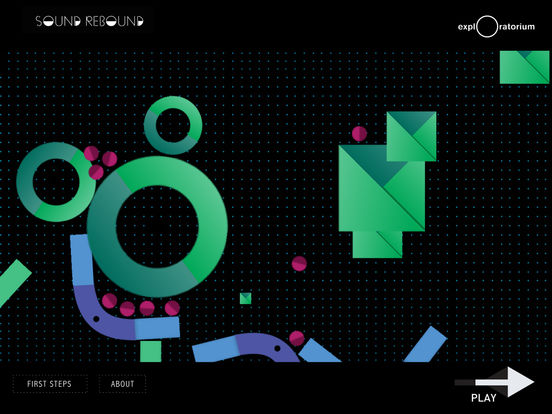 "Sound Rebound is an offbeat experience of color and sound that invites you to create ricochets, bounces, or bumps to investigate seeing and hearing. Imagine yourself inside a fluid world of 2-D shapes and design. What does it look and sound like? That’s up to you," writes the Exploratorium of its newest app release (November 2016; iOS only). This exploratory play app -- a kind of musical pinball game -- invites users to experiment with shapes and sounds for a unique visual/musical composition.
A brief video tutorial gives an introduction to the app's functionality. From there, choose a "blank slate" screen, select one of four elaborate pre-set "playfields," or tap "Feeling Lucky" for a random playfield. (The pre-designed playfields variously offer abstract patterns and representations of objects like a sailboat or a rainbow, giving users some inspiration for their own designs.) Each playfield has a black background with a subtle light-blue grid, allowing the bright shapes and their effects to take center stage.
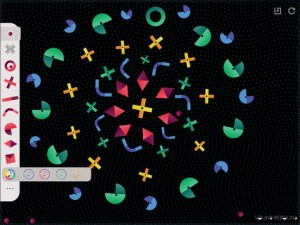
Tap to add shapes such as bars, curves, squares, and diamonds to the playfield; these shapes can be easily resized, rotated, or deleted. Double-tap a shape to add a "pin," allowing it to spin or rock. Different colored shapes make different instrumental sounds when struck: green for piano, yellow for wind instruments, blue for strings, and red for bass and percussion. A gray X-shape absorbs balls rather than rebounding them, immediately halting sound along with their bouncing and rolling.
Once you have some shapes in place, begin adding balls to start making sound. Varied types of balls create unique auditory and visual effects -- for instance, dropping a square "ball" adds a high, triangle-type notes to the soundscape, while choosing an illuminated ball introduces the play of light and shadow. All of the notes and chords seem to be drawn from one composition, so your creations are always harmonious.
Tap the ellipsis icon at the bottom of the toolbar to turn on/off options to steer the balls by tilting your device or to "unbound" the edges of the playfield. You can reset only shapes, only balls, or an entire playfield at any time, or save it for future experimentation.
Available for iPhone, iPad, and iPod touch (requires iOS 8.3 or later); free. Recommended for primary users and up.
Roger, who walked by as I was testing Sound Rebound, said it reminded him of composer Brian Eno's experimental music apps -- if this concept appeals to you and your children or students, you may want to check those out as well. Hervé Tullet and Chronicle's app Press Here offers a similar experience for very young users.


Added To Cart
RELATED


RECOMMENDED

Please register with us to continue reading.
ALREADY A SUBSCRIBER? LOG IN
We are currently offering this content for free. Sign up now to activate your personal profile, where you can save articles for future viewing.
ALREADY A SUBSCRIBER? LOG IN
Thank you for visiting.
We’ve noticed you are using a private browser. To continue, please log in or create an account.

Add Comment :-
Be the first reader to comment.
Comment Policy:
Comment should not be empty !!!