


2018 School Spending Survey Report

Find more great Horn Book content at these links:
Recommended books: reviews and themed booklists
App and e-book reviews
Movie reviews
Event news and recaps
Events calendar
Tayasui Tangram app review
Tayasui Tangram (Tayasui, 2013; iOS only), which bills itself as “a modern variation of the classic chinese [sic] puzzle,” has two main areas: “Models” and “Build.
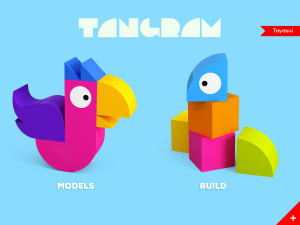 Tayasui Tangram (Tayasui, 2013; iOS only), which bills itself as “a modern variation of the classic chinese [sic] puzzle,” has two main areas: “Models” and “Build.” The “Models” section was exactly what I think of when I hear the word tangram: puzzles using geometric shapes. There are three screens’ worth of animal outlines; the puzzles get progressively harder, but you can do them in any order. For each outline, there are colorful shapes at the bottom of the screen. Drag them all into place so they fit in the outline, and you’ll get a thumbs-up and a “well done,” and then your completed animal will be transported to an outdoor scene where it can do its thing.
What that means depends on the animal. The fox howls. The blue and purple animal that also looks kind of foxlike (a cat?) blows a raspberry. The chicken squawks and lays eggs. The rabbit produces exactly what real rabbits produce. (Yes, it’s what you’re thinking). The skunk releases a cloud of bubbles meant to symbolize scent; I’ll leave the sound effects to your imagination. It’s a silly and probably crowd-pleasing reward for successful spatial reasoning.
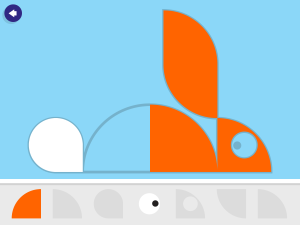 bunny in progress
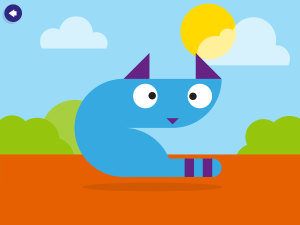 fox-cat
The “Build” section has a lot more room for creativity, as you make up animals of your own. This section offers five menus, some of geometric shapes and some of more obvious body parts (eyes, tails). Once you decide to add, say, a triangle to your creature, you can rotate it, which gets you thinking about how shapes work together, just as the “Models” section did. Really, you can make anything, living or inanimate — but it’s hard to resist adding those googly eyes. When your creation is ready, you can press a “play” button and then drag it around the screen. You can also take a picture of what you’ve made at any point in the process.
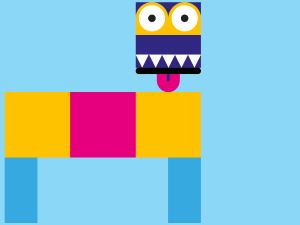
This app is simple, and there were times when I expected more to happen. Once you’ve built something, for instance, the payoff is pretty much just that you get to move it around the screen. Still, it’s satisfying to put the puzzles together in “Models,” and “Build” lets you try out a virtually endless array of ideas. Each section is a fun introduction to geometry.
Now, if you’ll excuse me, I’m off to build a cow out of green triangles.
Available for iPhone and iPad, and iPod Touch (requires iOS 6.0 or later); $1.99. Recommended for preschool and primary users.


Added To Cart
RELATED


RECOMMENDED

Please register with us to continue reading.
ALREADY A SUBSCRIBER? LOG IN
We are currently offering this content for free. Sign up now to activate your personal profile, where you can save articles for future viewing.
ALREADY A SUBSCRIBER? LOG IN
Thank you for visiting.
We’ve noticed you are using a private browser. To continue, please log in or create an account.

Add Comment :-
Be the first reader to comment.
Comment Policy:
Comment should not be empty !!!