



2018 School Spending Survey Report

Find more great Horn Book content at these links:
Recommended books: reviews and themed booklists
App and e-book reviews
Movie reviews
Event news and recaps
Events calendar
The Weather app review
Tinybop's new app The Weather (number 6 in Tinybop's Explorer’s Library; February 2016; iOS only) doesn’t give you any directions or tutorial to start.
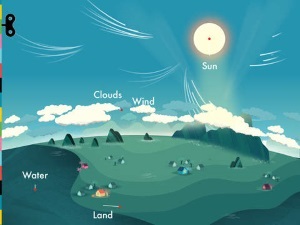 Tinybop's new app The Weather (number 6 in Tinybop's Explorer’s Library; February 2016; iOS only) doesn’t give you any directions or tutorial to start. None. The home screen is a simple yet elegantly animated landscape with a few scattered houses, situated beside a sea. A pull-out sidebar menu provides four buttons, each showing a different general weather type such as sun and wind, but that’s it. (If you do get stuck, there is a downloadable handbook with tips and lots of additional information.)
After some trial and error — which was kind of fun and also more than a little frustrating — I selected the sunny button on the menu, and eureka! a circle appeared around one of the houses. Tapping that circle brought me into a close-up of the house, with the option to zoom in even further on a pet dog, a windowsill, or a woman sitting outside with a glass of water. (By the way, all the people in this app are actually silhouettes with human bodies and animal heads. This one was a cat.) By sliding my finger up and down a thermometer, I could control the temperature surrounding the house. I watched the woman’s glass of water sit flat and still when the temperature was mild and freeze up as the environment became frigid. In this way, the app teaches users not only about weather, but also about cause and effect.
 sidebar menu with the "precipitation" house
Each house on the home screen highlights a different type of weather, and sun is the most tame of them: one of the houses involves a tornado and another one a hurricane.
 "tornado" house
Users control how extreme the weather gets in the micro-environment around each house. It is entirely possible to leave storms at a level one or two, for example, but I wanted to see how far I could push everything. What would happen if I brought the hurricane up to a level five, as measured on the anemometer? (Spoiler: The seaside house blows away.)
Off to the side of every scene, somewhere in the air or the water, was another little circle. Tapping it zoomed in to the molecular level. The molecules were gas or liquid (moving with that same beautiful, hypnotizing animation) if the weather was warm and solid if it was freezing. The simple and appealing graphics are accompanied by optional labels.
Because The Weather invites you to discover and control all the elements of the app without explicit direction, it encourages exploration. It’s rewarding to discover something new in this app — and isn’t that the way learning should be?
Available for iPhone, iPad, and iPod touch (requires iOS 7.0 or later); $2.99. Recommended for primary and intermediate users.



RECOMMENDED

Please register with us to continue reading.
ALREADY A SUBSCRIBER? LOG IN
We are currently offering this content for free. Sign up now to activate your personal profile, where you can save articles for future viewing.
ALREADY A SUBSCRIBER? LOG IN
Thank you for visiting.
We’ve noticed you are using a private browser. To continue, please log in or create an account.

Add Comment :-
Comment Policy:
Comment should not be empty !!!
Joann Sescila
Im so very impressed and proud of your writing talent.Posted : Mar 18, 2016 01:18